Altivy CMS Contact Request a demo

Your syllabus, your exams, and a training record you only write once

Build a course the way your syllabus is already written. A flight booked in Altivy Manager creates the training record for you, and once the instructor has graded it that one record is the objective progress, the hours against expected, and the unit standard result for the regulator.
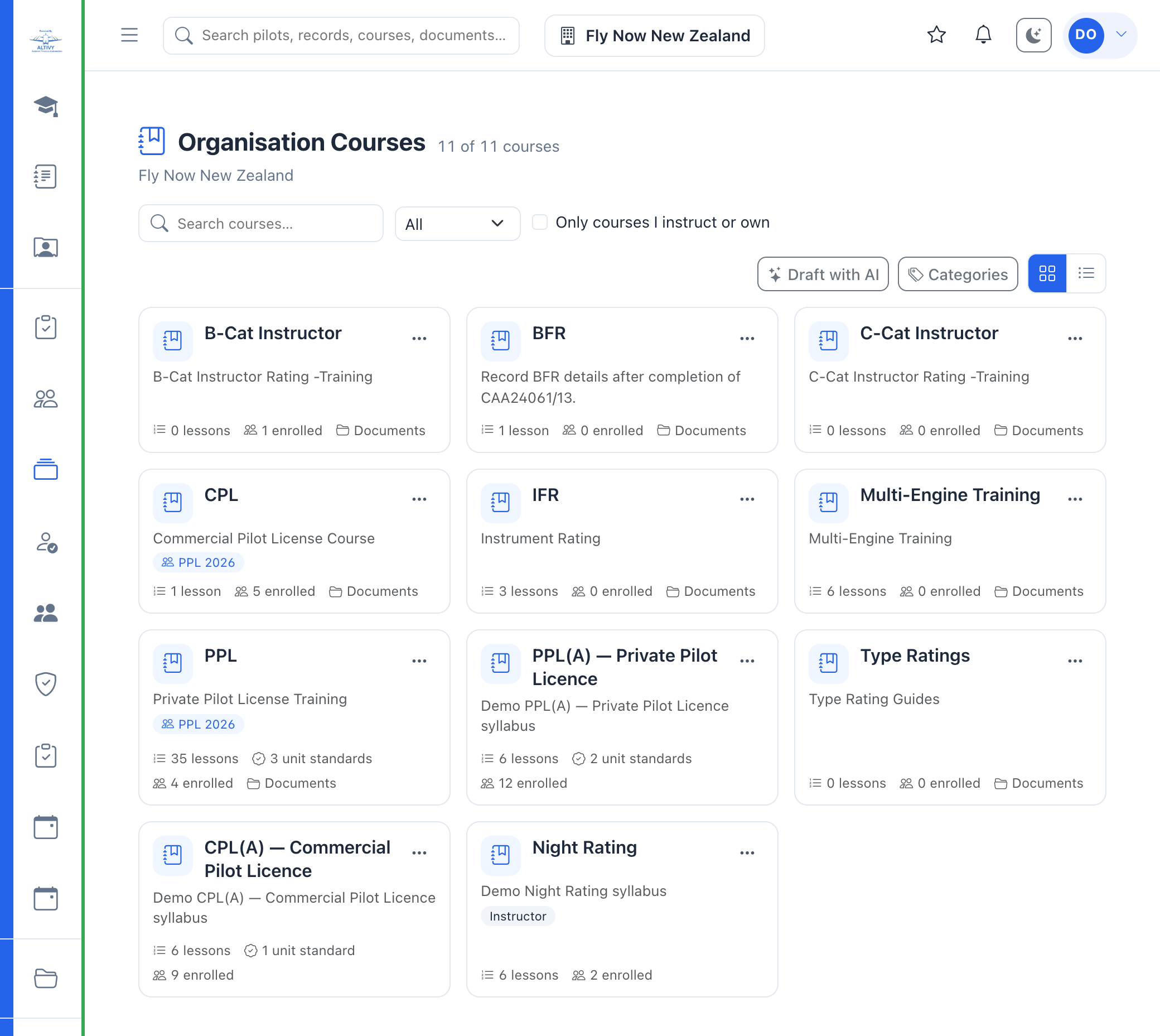

The Organisation Courses screen in Altivy listing PPL, CPL, IFR, Night Rating, Type Ratings and instructor rating courses, each showing its lesson count, unit standards and how many people are enrolled
Who uses it

One system, four jobs

Altivy Learning is part of Altivy, not a separate login. The course, the booking, the aircraft and the logbook are the same system.

The student

The syllabus in order, with the briefing notes, the CAA material and the knowledge check for each lesson. Progress is saved where you left it.

The instructor

The booking has already made the record. Grade the objectives, enter the times, set the next lesson. The private instructor guide stays out of the student's view.

The CFI

Hours flown against expected hours for every student, objective progress across the school, and who is behind on which lesson.

The administrator

Unit standard results ready for NZQA, currency requirements with the people who are due, and a report for the regulator.

Courses and lessons

A course shaped like the syllabus you already teach

A course holds its lessons in order, and each lesson carries the briefing text, the documents a student needs, a video where one helps, and a knowledge check before the next lesson opens.

  • Lessons in sequence, each with its expected hours and its objectives.
  • Documents attached to the lesson, so the CAA booklet sits with the briefing that refers to it.
  • Knowledge checks with their own pass mark, taken before the lesson is signed off.
  • Unit standards mapped to the course, so a completed objective counts towards the standard.
  • An instructor guide only instructors can open, alongside the student-facing material.
A PPL(A) course: six lessons, two unit standards, twelve enrolled, and every tab that makes up the course.
What the student sees

The lesson, the material and the check, on one screen

A student opens the course and works down the syllabus. The briefing note, the reference document and the knowledge check belong to the lesson, so there is one place to look for the current version.

  • Step through the syllabus with the list of lessons beside it.
  • Open the document from the lesson rather than a shared drive.
  • Take the knowledge check and see the pass mark before starting.
  • Come back where you left off, on a phone at the aircraft or on a laptop at home.
Lesson one of the PPL(A): the briefing, the CAA GAP booklet and the knowledge check.
Drafting a course

Paste the syllabus, edit the draft

Describe the course and paste the material you already hold, whether that is a regulator's syllabus, your own lesson plans or a set of notes. Altivy returns a draft course with lessons and check questions, and you edit every one of them before anybody is enrolled.

  • The draft follows your material, down to your lesson numbering and your exercise names.
  • Choose the shape: how many lessons, how many stages, how many check questions.
  • Everything stays editable, including the questions and the order of the lessons.
Drafting a night rating syllabus from pasted material, with the lesson and question counts set.
Certificates

Lay the certificate out once, issue it on completion

A certificate design belongs to the organisation. Attach it to a course and it is issued the moment a student finishes, with their name, the course, the date and a certificate number filled in.

  • A drag and drop designer with merge fields for the name, the course, the date, the number and the signatory.
  • Issued automatically when the course completes, or by hand.
  • Verified by number and QR code on a public page, so an employer can check one.
  • Downloaded from My Courses, and listed on the transcript with every other one issued.
Certificate designs: one of your own, one shared across the platform.
Exams and question bank

Assessed papers, practice papers, and a bank to draw from

An exam can be attached to a lesson as a knowledge check or stand alone as an assessment. Each carries its own pass mark, time limit and attempt count, and the questions can be drawn at random from a shared bank.

  • Timed papers with a pass mark and a limit on attempts.
  • Practice papers that never complete an objective, with their own allowance of runs separate from the assessed attempts.
  • A question bank shared across courses.
  • Results released by a marker where an answer needs a person to read it.
  • Assessment against an objective, so a pass marks that objective competent and counts towards the unit standard.
A meteorology assessment, a lesson knowledge check and an air law practice paper.
Training records

Booked in Altivy Manager, the record is already waiting

You do not start a training record by hand. When a flight is booked in Altivy Manager the record is created here for you, with the student, the instructor, the aircraft and the date already on it. The instructor opens it after the flight, grades the objectives and enters the times.

  • The booking creates the record, so the instructor's pending list fills as the day is booked.
  • The booking category sets the role: dual, solo or pilot in command, and whether the record needs completing or is already done.
  • A re-sent booking updates the same record rather than making a second one.
  • Flight time and instructor ground time on the one record, with objectives graded while the detail is fresh.
  • Filter by date, student, instructor or status, and export to CSV.
Training records across the school, filtered by date, student, instructor or status.
Flight and weather

The flight the record came from, on the record

A completed lesson is matched to the aircraft's ADS-B track by registration and time. The training record then shows the route flown, the airborne and landed times, and the weather at the time of the flight, so the debrief starts from what happened rather than what was planned.

  • Route and legs from the track, with the airborne and landed times.
  • METAR at departure and arrival and a GRAMET cross section along the route.
  • A match confidence note, so a doubtful match is never passed off as certain.
  • Opens in full in the CMS when the instructor wants the detail.
ZK-JGP, a Hamilton local on 24 July: the weather summary, the track and the cross section.
Approach analysis and playback

Score the approach, then watch it back

On an IFR flight the analysis picks the approach flown, or you choose it, and scores the flight against the procedure: the track, the altitude at each fix and the minima. Flight playback replays the whole flight in the tracker, inside the record.

  • Approach and departure procedures detected from the track, or chosen by hand.
  • A debrief with the deviations at each fix, for the instructor to open at the table.
  • Playback in the tracker, opened on that flight's time window.
  • Shared by link, so the student can watch it again at home.
The flown track, with the approach and departure procedures ready to analyse.
A real lesson

One PPL lesson, and the flight that went with it

This is a real lesson from a school using Altivy, with the student, instructor, aircraft registration and date taken out. The booking created the record and the flight was matched to it from ADS-B, so the replay, the weather along the route and each approach are on the record next to the grade.

PPL lesson 17Forced landing without power considerations

Press play to replay the flight. Times run from take-off.

Hours against syllabus

Who is over the hours, lesson by lesson

Each lesson in a syllabus has expected hours. The matrix puts every student against every lesson and colours the cell by how the hours flown compare, so a student taking twice the expected time on one exercise is visible before the course is finished.

  • A row per student, a column per lesson, with the expected hours in the heading.
  • Colour by comparison: under, at, over, and twice the expected hours.
  • Last lesson and next lesson for each student, with total hours against the course total.
  • Enrolment progress beside the hours, so a student's percentage complete and their hours flown are on one row.
Hours flown against the expected hours for each lesson of the PPL(A).
Unit standards

Results in the shape the regulator asks for

Map unit standards onto the course and a standard is complete when every required objective is competent. The result is then reportable per learner, per standard and per cohort, with the credits counted.

  • Completion by standard, with the ones furthest from complete shown first.
  • Per learner and per cohort, for a class or an intake.
  • Credits achieved and median days to complete.
  • A regulator report and a CSV, rather than a spreadsheet rebuilt each time.
Unit standard completion by standard, learner and cohort, with the credits counted.
Reporting to the regulator

Results out, in the form NZQA expects

The results are derived, not typed again. A standard is complete when every required objective is graded competent, so what leaves the system is what the training records already say.

  • Per learner, or summarised, and filtered by student, NSN, standard or title.
  • PDF for the file, CSV for the regulator, from the same screen.
  • Manage the catalogue of standards and their credits in the same place.
  • A submission freezes its lines, so what you reported stays exactly as reported, and can be marked submitted or voided afterwards.
Per-learner results with the credits and objectives met, ready for PDF or CSV.
Currency and requirements

What your pilots must keep current, and who is due

Set what counts as done, how long it stays valid and what should happen when it lapses. Altivy then holds the list of who is current, who is due soon and who is overdue, and can warn on the people who have gone past.

  • Any of the listed items counts, so a BFR, a competency check or a rating renewal can each satisfy the same requirement.
  • A validity period per requirement, counted from the last one done.
  • Warn or block when someone is overdue.
  • Preview tonight's run before the reminders go out.
  • You set how many days before or after the due date, for one requirement or for all of them. Set none and nothing is sent.
  • And what it says. Five messages, shown as the pilot will read them, in your own words or the standard ones.
A BFR requirement: valid 24 months, 19 pilots, five due soon.
Reporting

The reports a flight school is asked for every month

Each of these opens from one index and returns you to it, so a CFI answering three questions on a Monday morning is not hunting through menus.

  • Hours and currency for one student, which is the report a licence application asks for.
  • Teaching hours, currency and observations per instructor, and their flight hours month by month for billing.
  • Objective progress across knowledge, technical, non-technical and attitudinal grading.
  • Explore views for training activity, objectives and unit standards when the question is about the whole school rather than one person.
  • Course uptake: who enrols, how many finish, how long it takes them, and how far the rest have got.
  • Papers waiting to be marked, oldest first, across every exam rather than one at a time.
  • Compliance as a dashboard, over the same records as the list: which requirement your school is worst at, and what falls due over the next six months.
The reports index, with the explore views and the counters underneath.
Remediation

Which lessons get flown again, and what that costs

When an instructor writes up a lesson they can say it needs flying again, and why. Altivy keeps the answer, on the student's record and across the school, so a syllabus that is quietly costing extra flights shows up as a number.

  • Three reasons, never added together. To reach the standard, the aircraft cut it short, or the weather did. Only the first is about the pilot.
  • On the student's record, the hours their repeats cost beyond what the syllabus expects, which is not the same as the hours flown in them.
  • Which lessons it keeps happening to. A lesson well above the others may be harder than its place in the syllabus suggests.
  • Each instructor's rate against the lessons they taught, because a count on its own says more about who teaches the hard lessons than about how they teach.
Why lessons were flown again, and which lessons it happens to.
Classes

The intake that moves through the syllabus together

A class is a cohort working through a set sequence of courses, often over two or three years. The list leads with what a coordinator needs at a glance: how many students, how many courses, and when it runs.

  • A named intake with its year, start date and finish date.
  • Several courses in one class, so a programme is managed as a programme.
  • Running cohorts sort first, because a finished one is history.
  • Progress by cohort in the unit standards reporting, beside per-learner results.
The PPL 2026 intake: five students, two courses, running to December 2027.
Regulator forms

The CAA Part 61 forms, filled and signed in the system

Altivy ships a library of the NZ CAA Part 61 certifications a club actually issues. An instructor picks one for a pilot, it prefills from the record, and signing it is a separate deliberate step that cannot be undone.

  • Eleven Part 61 forms including the biennial flight review, first solo day and night, basic mountain flying, cross-country, English language proficiency, multi-engine and type ratings.
  • Draft, complete, then sign, with the signature requiring the instructor to re-authenticate.
  • It becomes the endorsement, carrying its expiry date onto the pilot's currency.
  • A logbook sticker with it, and the instructor who signed can amend or reissue their own.
  • Your own wording is kept: a club that has corrected a form is never overwritten by a later update.
Three endorsements, and the Part 61 forms that produced them: two signed, one still a draft.
Logbook stickers

The sticker is issued from the record

Stickers come from a template the organisation owns, the BFR, a type rating, night, C-Cat supervision and the rest, or are written on the spot. They are signed in the app and locked once signed.

  • Issue from a template or write one, from the pilot's record, from a signed form, or as a lesson is completed.
  • Signing asks the instructor to re-authenticate, and a signed sticker is changed by reissuing it, so the history stays.
  • A BFR or medical sticker updates the expiry date on the pilot's record.
  • Print it for the paper logbook, or leave it on the electronic one.
Five stickers on one pilot's record, one still to be signed.
Personal logbook

One logbook, every organisation

Every pilot has a logbook of their own that only they can see. Completed training flights land in it on their own, hours flown elsewhere are added by hand or scanned in from the paper book, and every total and currency figure in Altivy is summed from it.

  • Totals by role, aircraft, instrument, specialist flying and tag, over any period.
  • Scan a paper logbook page by page; the lines are read and shown beside the page image for checking before they are kept.
  • The same entries feed the pilot's own record and the figures the school's reports use.
  • Private: an administrator cannot open another pilot's logbook.
A logbook summary: the totals, and the split by role underneath.
Meetings

Safety meetings and standardisation, with the actions that follow

Monthly safety meetings and instructor standardisation sit in the same system as the training they are about, as a list or a calendar, with agendas, attendance and the actions each one raises.

  • My meetings across every organisation, which matters to the 151 people who hold records at more than one club.
  • This organisation separately, including the meetings you were not personally invited to.
  • Draft and scheduled states, so an agenda can be prepared before it is circulated.
  • List or calendar, whichever suits the question being asked.
Safety meetings and instructor standardisation, in list or calendar view.
Procedure trainer

A GNS 430W in the browser, before the aircraft

The 430 trainer runs a GNS 430W with a G5, a GFC 500 autopilot and New Zealand and US navigation data and procedures, and soon anywhere in the world through a Navigraph subscription. Students practise the button pushing and the procedures at home, so the aircraft time goes on flying.

  • Current AIRAC navigation data for New Zealand and the United States, with every New Zealand procedure from the AIP and the FAA's US procedures. Soon, anywhere in the world through a Navigraph subscription.
  • G5 attitude and HSI displays and a GFC 500 autopilot panel beside the unit.
  • Scenarios that line the aircraft up and fly it, so a procedure can be loaded and flown end to end.
  • Included with Altivy Learning. Switch it on for an organisation in Super Admin and its members open the trainer from the menu, signed in, at no charge.
  • For everyone else, three days free, then $8 a month or $80 a year in New Zealand (US$6 or US$60 elsewhere) at 430trainer.myflight.co.nz. More about the trainer.
GNS 430W Trainer - try it free for 3 days
The GNS 430W trainer, with the G5 and the autopilot panel.
Also included

The rest of it

Altivy Learning is part of the wider Altivy system, so the booking, the aircraft and the flight a record came from are one click away.

Instructor dashboard

Records to complete, students needing attention, the next meeting and the open actions, on the instructor's first screen.

Objectives and grading

Knowledge, technical, non-technical and attitudinal objectives, graded on the lesson record and reported per student.

Renewals calendar

What falls due and when, so a refresher can be booked before the date rather than after it.

Enrolment and approval

Enrol a student directly, or let them ask and have an instructor approve it.

Completing a lesson

Five steps from the lesson details to the attachments, with the objectives graded on the way and a sticker issued on the way out.

Feedback on every screen

A feedback button on every page sends the note, with a screenshot, to the people building the system.

Permissions per person

Let one instructor write the courses without promoting everyone who holds that role, or stop one person doing something their role allows.

CSV and PDF out

Records, unit standards, objectives and the hours matrix each leave as a CSV or a PDF when someone asks for one.

Roles per course

Who owns a course, who instructs it and who may edit it, set on the course itself.

Multiple organisations

One login across the clubs or schools a person belongs to, with the courses and records of whichever one is selected.

Bring a syllabus you already teach

Tell us how many students you train and what you use today, and we will set the syllabus up in Altivy so you can see your own course rather than a sample one.