Admin sign in Request a demo

The club's website, the fleet tracker and the booking widget, on the system the training runs on

Altivy CMS is the website platform behind flight schools and aero clubs on Altivy. Pages, blog, events and a shop that the office edits themselves; a live map of the fleet with the weather and the approach analysis behind every flight; and the Altivy Manager booking widget, so a member books from the page they are already on.

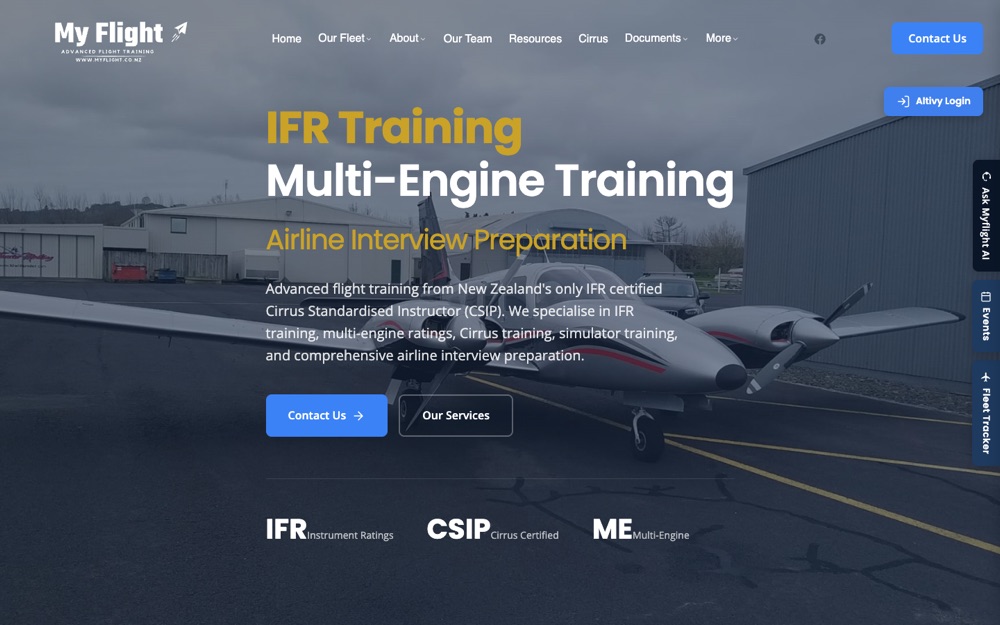
The MyFlight home page on Altivy CMS: a hero over a photo of a twin at Ardmore, the menu across the top, a Contact Us button, an Altivy Login button and side tabs for Ask MyFlight AI, Events and Fleet Tracker
Who uses it

One platform, four jobs

Altivy CMS is part of Altivy, not a separate login. The website, the booking, the aircraft and the training record are the same system.

The office

Change a page, post an event, reply to a contact form or refund an order without asking a web developer. Draft it, preview it, then publish.

The member or student

Find the fleet, the team and the programmes, book an aircraft from the booking widget, watch the fleet on the map and buy a voucher in the shop.

The CFI

Every flight the fleet makes is tracked. The weather at the time and the approach analysis are a click away, and they land on the training record in Altivy Learning.

The committee

One place for the legal pages, the newsletter, the analytics and who is allowed to change what, with an audit log of every change.

Pages and publishing

Build the page from sections, publish when it is right

A page is a stack of sections: a hero banner, text, cards, a gallery, a pricing table, a blog feed, shop products, the live map. The page editor shows the real page in a live preview; click any text and type over it, drag sections into order and pick spacing and background presets. The draft saves as you go and goes live when you press Publish.

  • A library of section templates, dragged into order on the page.
  • Staging and live for pages, posts, events, fleet, team and menus, with a preview link for the draft.
  • Inline editing in the live preview, with undo and redo, autosave, and phone and tablet views.
  • Ask AI drafts a section or a whole page into the editor, with images made on request, for you to edit before publishing.
  • Import an existing site: the crawler reads the sitemap, pulls the headings, text, images and menu, and maps them onto sections for you to tidy.
The page editor: sections, live preview and settings on one screen.
Twenty-one section types to add.
A syllabus page as published.
Menus and branding

Your logo, your colours, your menu

The menu is built by dragging items into order, three levels deep for the header and grouped columns for the footer. The header can sit over the hero and shrink as the page scrolls. The colours, the fonts and the business details are set once and used everywhere.

  • Header and footer menus with dropdowns, colours and hover styles per item.
  • Nine site colours and two Google fonts, changed with a live preview.
  • Logo and favicon, with an inverted logo for dark backgrounds.
  • Phone, email, address, ICAO code and opening hours held in one place and shown wherever a page needs them.
  • Floating widgets: Google reviews, WhatsApp, the AI assistant and the fleet tracker, stacked so they never overlap.
  • A mobile bottom bar with Call now, Contact us, WhatsApp and reviews buttons, each switched on in the settings.
The team page, in the site's own colours and fonts.
The menu manager.
On a phone, with the mobile bar.
Blog, events, newsletter and forms

The news, the calendar and the inbox

Posts, events and newsletters are written in the same editor as the pages. A contact form is built from the fields you want, and every submission is tracked from new to replied to archived, with the reply sent from the admin screen.

  • Blog posts with categories, tags and a grid, card or list layout, and AI suggestions for a title or an excerpt.
  • An event calendar with colour-coded categories, multi-day events and a list view on a phone.
  • Contact forms with text, select, file upload and date fields, and a status for every submission.
  • A newsletter list that syncs the pilot and student accounts from Altivy, with campaigns written in HTML.
  • A feedback button on every public page, with a screenshot or recording attached.
The events calendar, with categories and a list view for phones.
Events in the admin.
Newsletter campaigns: sent, scheduled, draft.
Shop and payments

Gift vouchers, packages and merchandise, paid by card

Sell training packages, gift vouchers and merchandise from the site. Stripe takes Visa, Mastercard, Apple Pay and Google Pay, the customer gets an account with their order history, and the office works the order from new to shipped to delivered, with refunds from the same screen.

  • Gift vouchers: a trial flight or flying credit of any amount, emailed to the recipient as a printable gift card with a unique code.
  • A voucher register to look a code up, redeem it after the flight, cancel, resend, or issue one for a counter sale.
  • Products with categories, tags, images, stock and SKUs, and a Shop products section to sell on any page.
  • A cart and checkout that remembers the order across the session.
  • Customer accounts with order history, addresses and password reset.
  • Order management with search, status and refunds, and EFTPOS or cash orders marked paid from the office.
  • Transactional emails for confirmations, shipping, refunds and replies, edited in the admin.
The shop, with Stripe behind the checkout.
The voucher register.
The gift card the recipient gets.
Fleet, team and programmes

The aircraft, the instructors and the courses on offer

Each aircraft has a profile with its registration, type, photos, tags and rates. Each instructor has a profile with their role, qualifications and a photo. Each training programme has its pricing tiers, entry requirements and syllabus. All three are edited by the office and published when ready.

  • Aircraft profiles with photo galleries, wet and dry rates and tags such as IFR or multi-engine.
  • Team profiles grouped by category, with independent visibility.
  • Training programmes with their own address on the site, pricing tiers and a structured syllabus.
The fleet in the admin, with rates and tags per aircraft.
Team profiles in the admin.
The team page as published.
Live aircraft tracking

The fleet on the map, and every flight kept

The fleet tracker shows each aircraft's position from ADS-B on a map with the airspace, the weather radar and the wind. Every flight is kept, so a flight from last month can be played back, shared by link or recorded as a clip.

  • Live positions from more than one ADS-B provider, with automatic fallback.
  • Airspace, precipitation and wind layers, switched on and off per map.
  • Playback of any aircraft over any window, with a share link and an emailed clip.
  • A fleet list with who is flying now and who flew today.
  • Embedded on the site as a page or a floating tab, with its own share links.
The tracker: thirty aircraft tracked, three flying, with wind and rain on the map.
Playback of a flight.
The forecast for any point on the map.
Flight weather and debrief

The weather on the day, and the approach scored

For every flight the tracker kept, the CMS builds a weather report: the METARs at each end, a GRAMET cross section along the route and the track on a map. On an IFR flight the analysis picks the approach flown and scores it against the procedure. Both open from the training record in Altivy Learning.

  • A weather report per flight, with the summary line a pilot reads first.
  • Approach and departure procedures detected from the track, or chosen by hand, and a debrief with the deviations at each fix.
  • An aviation API that matches a booking to a flight by registration and time, which is how the training record finds its flight.
  • Shared by link, so the student has the debrief at home.
ZK-JGP on 24 July: the weather summary, the track and the cross section.
An approach debrief.
Finding a flight by registration and date.
Bookings and training

Book from the website, and the record is waiting

The Altivy Manager booking widget sits on the site as a floating button or a full page, in the site's colours. A member books an aircraft without leaving the page, and a flight booked that way creates the training record in Altivy Learning for the instructor to complete after the flight.

  • The booking widget as a floating button on every page or a page of its own.
  • One login: the Altivy Login button on the site takes the member straight into their account.
  • Pilot and student accounts synced into the newsletter list.
  • The training record, the logbook, the exams and the stickers, in Altivy Learning.
The instructor's dashboard in Altivy Learning, with the record the booking created.
A completed training record.
Objectives across a course.
AI help and SEO

An assistant trained on your own site

Up to three assistants answer visitors from your pages, fleet, team, programmes, products and events, and nothing else. In the admin, a help assistant knows every screen and which one you are on. An SEO assistant reads the site and suggests the titles and descriptions.

  • Public assistants with their own avatar, colours, welcome message and disclaimer, answering only from your content.
  • Admin help on every admin page, aware of the page you are on.
  • SEO: titles, descriptions, Open Graph, geo tags, canonical links and structured data, with the assistant suggesting the copy.
  • Conversation review: read, rate and correct what an assistant said, and the correction becomes part of what it knows.
  • Ask AI in the page editor drafts sections from a sentence; a person edits and publishes.
The assistants, their training content and their conversations.
Ask AI in the page editor.
The assistant on the public site.
Analytics

See what visitors do, without tracking them

Page views, link clicks, click positions and scroll depth are counted by the platform itself, with no cookies, no fingerprinting and no personal data, and visitors who ask not to be tracked are not. The admin turns that into an overview, a heatmap for each page and the paths people take through the site.

  • An overview of visits, top pages, referrers and the links people click.
  • Click heatmaps for each page, by desktop, tablet or phone, with how far down people scroll.
  • User flow: entry pages, the steps between pages, time on each page and where people leave.
  • AI notes on a page or on the flow, suggesting what to change and why.
  • Google Analytics as well, if you want it, from one setting.
The click heatmap for the home page.
The overview.
The admin dashboard.
Documents, signing and email

The agreements, signed online, and every email in your words

The privacy policy, the terms and the rental agreement are drafted with an AI assistant and published like a page. Any page can be made a document to sign: the signer fills in the blanks, signs on screen, and a PDF goes to them and to the office. Every email the site sends is a template you can edit.

  • Legal documents with an AI that drafts, reviews and improves them, and the business details filled in for you.
  • Document signing: fields to complete, a signature pad, and the signed PDF emailed to both sides and kept in the admin.
  • Email templates for orders, gift vouchers, contact replies, password resets and welcomes, edited visually or in HTML.
  • An image library with folders, uploads and a picker on every admin screen.
  • A download as PDF button on any page you choose.
Legal documents, drafted with AI and published like a page.
Email templates.
Pages and agreements in one list, tagged.
Tenants and security

Every club on its own domain, on one platform

Each club or school is a tenant with its own content, settings, users and customers, on its own domain with its certificate issued automatically. Administrators are given the permissions they need and nothing more, and every change is logged with who, when and from where.

  • Custom domains with DNS verification and automatic SSL, or a club address under altivycms.com.
  • Three roles, super admin, admin and customer, with per-feature permissions for admins.
  • Hashed passwords, rate limits and security headers on every endpoint, and an audit log of every admin action.
  • A super admin dashboard across the platform: usage, tenants, domains, the audit log and the platform keys.
  • The security and compliance detail is on its own page: Security and compliance.
The security page, with the result of the latest automated check.
Also included

The rest of it

Altivy CMS is part of the wider Altivy system, so the booking, the aircraft and the training record are one click from the website.

Email templates

Order confirmations, shipping and refund notices, contact replies, welcome and password emails, edited in HTML, visually or as plain text.

Pricing tables

A section for pricing tiers on any page, with a featured tier, a per-hour or per-resource cost and a button on each.

Website import

Point the wizard at the old site. It reads the sitemap, pulls the pages, images and menu across, and maps them onto sections to tidy up.

Mobile toolbar

On a phone the floating widgets fold into one strip along the bottom, so the AI assistant, the events and the tracker stay a tap away.

Google and Facebook sign-in

Customers sign in with the account they already have, or with an email and password, on every tenant from one platform login.

Altivy Learning

The courses, the exams, the training records, the logbook and the regulator forms live in Altivy Learning, on the same login.

Bring the site you have now

Send us the address of your current website and we will import it into Altivy CMS so you can see your own pages on the platform rather than a sample.